Disaster Triage Systems: START, JumpSTART & SALT
How disaster and mass casualty triage works: the START, JumpSTART, and SALT algorithms, what red/yellow/green/black mean, and when each system fits.
Disaster triage is how first responders sort a large number of casualties in minutes, before enough help has arrived to treat everyone at once. It’s a different problem from triage in an emergency department: no rooms, no monitors, often no more than one responder per dozen patients, and a decision that has to hold up without a second look.
Three algorithms cover almost every mass casualty incident (MCI) in the field today: START for adults, JumpSTART for children, and SALT, the newer model meant to unify both. This guide covers what each one does, how the color-code categories work, and when to use which.
The color-code categories
Every disaster triage system sorts casualties into the same small set of categories, tagged by color so any responder — regardless of training level — can read a patient’s status at a glance.
| Category | Color | Meaning |
|---|---|---|
| Immediate | Red | Life-threatening injury, survivable with prompt care |
| Delayed | Yellow | Serious injury, can wait for care without dying |
| Minimal | Green | Walking wounded — minor injuries, self-care or last to be seen |
| Expectant | Gray | Unlikely to survive given the resources on scene (SALT only) |
| Deceased | Black | No respirations after the airway is opened |
START doesn’t use “expectant” as a separate tag — a patient who can’t be revived after airway repositioning is black. SALT splits that group in two, so responders don’t spend scarce resources on patients who won’t survive even with full intervention, without labeling them dead.
START: Simple Triage and Rapid Treatment
START is the original field triage algorithm, developed in Newport Beach, California, in 1983, and it’s still the standard most US EMS systems train on. It’s built to tag one patient in under a minute, using only what a responder can see and feel — no equipment.
The algorithm runs as a fixed sequence:
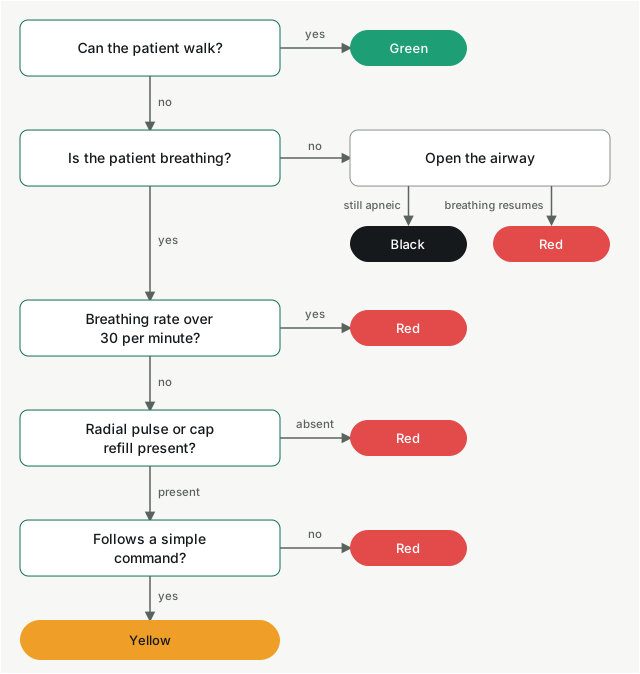
- Can the patient walk? If yes, tag green and redirect them to a holding area. This clears the “walking wounded” out of the way immediately, so responders can focus on who’s left.
- Is the patient breathing? If not, open the airway. Still not breathing → black. Starts breathing once the airway is clear → red.
- What’s the respiratory rate? Over 30 breaths per minute → red. 30 or under → move to circulation.
- Is there a radial pulse (or capillary refill under 2 seconds)? Absent → red, and control any major bleeding first. Present → move to mental status.
- Can the patient follow a simple command? No → red. Yes → yellow.
Every patient ends up red, yellow, green, or black, and the whole pass takes seconds per person. That speed is the point — START is designed for the first responders on scene, before enough help has arrived to do anything more thorough.
In Youfers, every patient in the Triage room comes with a START assessment. You reveal the questions one by one, pick the color, and see right away whether your call matches the protocol. Here’s how triage by the protocol works.
JumpSTART: the pediatric version
START’s respiratory-rate and mental-status checks don’t hold up well for young children, so JumpSTART adapts the algorithm for pediatric patients — generally anyone who appears to be a child, roughly under 8 years old. It was developed in 1995 by Lou Romig for exactly this gap.
The differences that matter:
- Ambulatory doesn’t equal minor. A young child may not walk to a voice command even if uninjured, so JumpSTART doesn’t rely on “can you walk” the same way START does for the initial sort.
- Apneic children get a rescue breath before being tagged black. If a child isn’t breathing and doesn’t start after the airway is repositioned, a responder checks for a pulse and gives five rescue breaths before making the black/red call — children can arrest from a clear airway obstruction and still be salvageable.
- The respiratory rate window is different. Under 15 or over 45 breaths per minute is red, reflecting normal pediatric ranges rather than adult ones.
- Mental status uses a modified AVPU scale (alert, responds to voice, responds to pain, unresponsive), with an inappropriate or posturing response to pain treated the same as “can’t follow commands” in adult START.
JumpSTART is meant to run alongside START at the same incident, not replace it — responders switch algorithms per patient based on apparent age.
SALT: Sort, Assess, Lifesaving Interventions, Treatment/Transport
SALT is the newer national model, developed to reconcile the dozen-plus local triage algorithms that had grown up around the country, START and JumpSTART among them. It adds a global sorting pass before any individual assessment, and it builds basic lifesaving interventions into the triage step itself.
Step 1 — Sort. The responder addresses the whole group at once: “If you can hear my voice, walk to [location].” That sorts patients into three rough groups by response:
- Walk on command → assessed last (likely minimal)
- Purposeful movement (wave, respond to voice) but can’t walk → assessed second
- No purposeful movement, or an obvious life threat → assessed first
Step 2 — Assess, with lifesaving interventions. Responders work through patients in that priority order, performing the interventions that take seconds and change the outcome as they go: opening the airway, controlling major hemorrhage, sealing an open chest wound, or giving an available antidote. The tag is assigned after those interventions, not before.
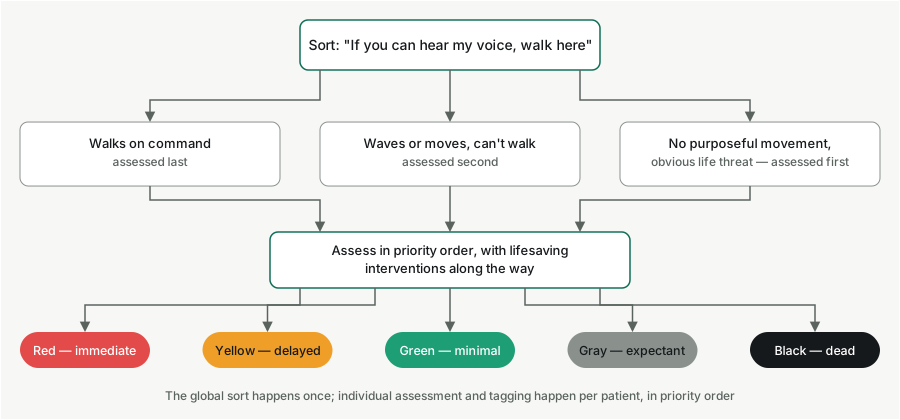
Categories. SALT tags five outcomes instead of START’s four — the “expectant” category is SALT’s main structural addition:
- Red: immediate
- Yellow: delayed
- Green: minimal
- Gray: expectant (SALT only)
- Black: dead
START vs. SALT: which one to use
Neither is universally “better” — they answer slightly different questions.
| START (and JumpSTART) | SALT | |
|---|---|---|
| Initial step | Individual assessment, in order encountered | Global sort by voice/movement, then priority order |
| Interventions during triage | None — tag first, treat after | Basic lifesaving interventions built into the assess step |
| Categories | 4: red, yellow, green, black | 5: red, yellow, green, gray, black |
| Best fit | Fast, large scenes; the long-standing US EMS default | Scenes where a few seconds of intervention (airway, bleeding control) changes the outcome, and where responders want one model that scales from a handful of patients to hundreds |
In practice, an EMS agency picks one as its protocol and trains everyone on it — mixing algorithms mid-incident is a common failure mode, since a green tag under one system doesn’t map cleanly onto another.
Common mistakes in disaster triage
- Re-triaging too slowly. A tag isn’t permanent. Patients deteriorate, and a system that doesn’t build in reassessment lets a yellow quietly become a red.
- Treating before tagging (in START). START’s speed comes from deferring treatment. Stopping to treat one patient during the initial pass slows triage for everyone behind them.
- Skipping the global sort (in SALT). Assessing patients in the order they’re found, instead of sorting by voice command first, erases SALT’s main advantage over START at large scenes.
- Confusing “expectant” with “deceased.” They’re different categories for a reason — expectant patients are alive and may still receive care if resources free up.
- Training on the algorithm once. Like any skill under pressure, triage speed and accuracy degrade without repetition — a responder who last practiced START a year ago will hesitate exactly when speed matters most.
Where this guide goes next
Deeper spokes under this pillar will cover:
- START triage, step by step, with worked examples
- JumpSTART in full, including the pediatric AVPU scale
- SALT triage, step by step
- START vs. SALT, expanded with scenario comparisons
- Triage tags and color codes across systems
- Reverse triage
- Pediatric GCS in the field
For how to train a team on these algorithms under real time pressure — not just read about them — see the mass casualty incident training guide.
Rehearse it in Youfers
Youfers runs a mass casualty incident against a model of your own department and tracks every decision for the after-action report.
Book a demo →